What Did That Error Message Mean?
Word 2007 Resources
Word 2007 Books
A list of books that will help you get up to speed with Microsoft Word 2007.
Word 2007 Videos
A comprehensive suite of free video tutorials created by Microsoft.
What Has Changed?
To compare two documents in Word 2007 go to the Review Tab and click on the Compare command. Select Compare. Using the browse buttons choose the original and the revised documents you want to compare:
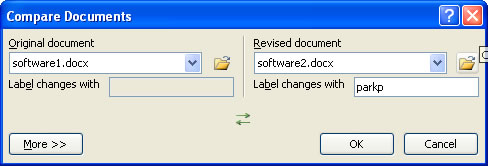
On clicking OK you are presented with 3 'columns'. In the right column the original document appears at the top and the revised at the bottom. In the centre is the compare document. All 3 columns scroll synchronously. You can accept differences by clicking against a difference and then clicking 'Accept' in the review tab. The review column on the left details what changes have been made and there is a summary at the top.
